



Forum Replies Created
-
3. November 2016 at 18:33 #23658
Update: I just added a switch to the „Raspberry Pi Settings“ Page, to change the default Wifi from wlan0 to wlan1. You may just use this setting and your wifi-stick should work. You need to do a Beta-Update on the „Reboot/Settings“ Page to get this feature, as it is not released yet.
Stefan
3. November 2016 at 15:48 #23649Hi,
you have to edit a file and add a rule for your Wifi Stick to make sure it gets named wlan0:
Login per SSH as user pi and do
sudo nano /etc/udev/rules.d/70-persistent-net.rulesnow add a new line and edit the old line that it looks like this:
SUBSYSTEM=="net", ACTION=="add", DRIVERS=="?*", ATTR{address}=="[MAC-ADDRESS-OF-YOUR-DEVICE]", ATTR{dev_id}=="0x0", ATTR{type}=="1", KERNEL=="wlan*", NAME="wlan0"
SUBSYSTEM=="net", ACTION=="add", DRIVERS=="?*", ATTR{address}=="*", ATTR{dev_id}=="0x0", ATTR{type}=="1", KERNEL=="wlan*", NAME="wlan1"
Change the part [MAC-ADDRESS-OF-YOUR-DEVICE] with your Mac-address of your wifi stick and change the name of the existing entry to wlan1.
This should do the trick.
All the Best,
Stefan-
This reply was modified 9 years, 10 months ago by
flysurfer.
11. Oktober 2016 at 17:31 #23374Hi Bjardne,
very good so far 🙂
If you really like to change the volume steps, this is a little more difficult, as we just use the file from IQAudIO. If you know how to compile a file and log in with SSH on the Pi, you can do it this way:
1. get the file from https://github.com/iqaudio/tools/blob/master/IQ_rot.c and edit lines
currentVolume = currentVolume + 10;
and
currentVolume = currentVolume - 10;
to the step you like – e.g. „5“ or „2“ to use smaller steps.2. complile the file with
gcc IQ_rot.c -oIQ_rot -lwiringPi -lasound3. change the existing file in /opt/IQ_rot with the one you just compiled
4. set file permissions with
chmod 777 /opt/IQ_rotThis should do the trick…
All the Best,
Stefan10. Oktober 2016 at 12:30 #23335Hi Mike / hi Simon,
the fix for the wolfson/cirrus logic card in the current version of Max2Play (version 2.37) uses a newer Kernel that fits the latest Max2Play-Image and uses a renamed Device Tree Overlay for the card.
This definitly works when using the latest Max2Play-Image -> Install Wolfson-Card on Raspberry Settings Tab -> Reboot -> choose Card in Audioplayer Tab (advanced Settings) and set prefered Audio-Output on Raspberry Settings Tab.
Older Max2Play-Images should still work, as the Bugfix just targets the latest Max2Play-Image based on Kernel 4.4.y
@Mike: After installing the Wolfson-Card with the Kernelchange, the change of the installed soundcard to „none“ doesn’t change the Kernel back to the original one. But it removes the DTOverlay entry to load the card on boot. If your card won’t work after the next reboot, make sure to select it again.All the Best
Stefan10. Oktober 2016 at 11:45 #23333Hi,
to get the Rotary Encoder on IQAudio-Cards working with Synchronisation of volume with Squeezebox Server (control with App / webinterface / rotary encoder) you need to add following to the command line options of Squeezelite (not dependend of build-in audio active /not active):
-o hw:CARD=IQaudIODAC -V Digital -QI also added this to the description of the Rotary Encoder now (in Beta).
Description of Parameters:
– The Parameter „-Q“ starts the synchronisation with the Squeezebox Server
– The Parameter „-V“ makes sure to use the correct alsamixer control
– The Parameter „-o“ uses the dircet hardware as audio output (needed to use volume control on alsa level)Important: This will only work with the Squeezelite in Max2Play and not in other distributions!
30. September 2016 at 11:39 #23266Hi Simon,
the Wolfson card drivers and the driver selection within „Raspberry Pi Settings“ should work with the current Max2Play Image. We will test this again with the latest version. EDIT: ok – there seems to be a problem with the newer Kernel… we work on this.
Cheers,
Stefan-
This reply was modified 9 years, 11 months ago by
30. September 2016 at 10:56 #23263Hi,
maybe the server was not available for a short period of time. I just tested the installation of the Plugin and it works fine.
If you still encounter problems, maybe the internet connection is a problem – try rebooting Max2Play and check again.
Regards,
Stefan30. September 2016 at 10:49 #23262Hi,
in the Settings / Reboot tab, could you remove the Autostart from „Autostart Desktop“ and try again? Jivelite starts the desktop automatically if this is not running yet. Maybe the RPi 1 is too slow and gets confused by 2 Desktops starting at the same time.
Regards,
Stefan23. September 2016 at 10:56 #23169Great job and thanks for sharing!!!
Anyone who likes to add this functionality to a Max2Play Addon? Using the Pluginbuilder this might be not to difficult to achieve.
Cheers,
Stefan23. September 2016 at 10:36 #23168Hi asplundj,
with the Google Music Plugin-installer on the Squeezebox Server tab in Max2Play web interface, it is not needed to do any further plugin installation within the LMS.
We only tested this with the Jessie version, as the old Wheezy-version will not be fully supported with further addons (to difficult for us to test all versions).
To install plugins from SSL-secured repositories within LMS your hint on libio-socket-ssl-perl is very good. We will add this as a patch to the Max2Play Squeezebox Server installation, as a lot of Repositories are hosted on Github.
Cheers,
Stefan22. September 2016 at 11:44 #23133Hallo Tom,
der Fehler liegt an der URL-Codierung des „+“ Zeichens. Das muss als „%2B“ eingetragen werden, dann funktioniert es.
Bsp: http://max2play:9000/status.html?p0=mixer&p1=volume&p2=%2B6&player=b8:27:eb:df:27:b3
Oder in deinem Beispiel
http://bad:9000/status.html?p0=mixer&p1=volume&p2=%2B6&player=b8:27:eb:f8:35:84&start=0Viele Grüße
Stefan16. September 2016 at 20:53 #23072Hi,
@gapmedia: once you change the Kernel on the Max2Play Image to support the Wolfson/Cirrus card, it won’t run anymore because the Kernelchange was only working with the older „debian wheezy“ based Max2Play version (you may still download this version on our page). I also removed this option in the newest version from the Raspberry Pi Settings Addon.@Jac: The WPS connection is just a way to do it more simple on startup for people who do not want to connect a LAN cable and have a router with WPS. In your first screen, do you find your wifi network in the list after you click „start scan“? If yes, after selecting your network and adding your password, does it show that you are connected or does it show any errors?
Regarding IPv6: you may disable this in the Raspberry Pi Settings Addon. If your Router supports IPv6 your Raspberry will also get an IPv6 address besides IPv4 and the URL in your Browser may change on a reboot of Max2Play… If you have problems, either disable IPv6 or enter the IPv4 Address instead of the name (e.g. „http://max2play“) in your browser. As IPv6 gets more popular I will try to get everything working with IPv6.
Stefan
16. September 2016 at 11:33 #23064Nachtrag zur Lösung
Diese Änderung wird in einem der nächsten Updates vorhanden sein und setzt automatisch den Nutzer für Squeezelite auf „root“ wenn der GPIO Parameter gesetzt ist (audioplayer.conf SYSTEM_USER bleibt „pi“):
in Datei /etc/init.d/squeezeliteSQUEEZELITE_PARAMETER=$(grep -a "SQUEEZELITE_PARAMETER" /opt/max2play/audioplayer.conf | sed -n -e 's/^[A-Z_]*\=//p') # NEUER CODE if [ $(echo $SQUEEZELITE_PARAMETER | grep " -G " | wc -l) -gt "0" ]; then USER=root fi # ENDE16. September 2016 at 11:26 #23063Hi Felix,
das hat mit dem Ändern des Nutzers zu tun. Es gibt ein paar Scripte (auch das zum Starten von Jivelite), die nach dem Benutzer prüfen (in der audioplayer.conf) und wenn dieser nicht „pi“ ist dann automatisch „odroid“ nehmen. Das liegt ein wenig an der Entwicklung von Max2Play (war anfangs für ODROID).
Um es zum laufen zu bringen müsste man entweder im Startscript von Squeezelite unter /etc/init.d/squeezelite den USER auf „root“ setzen und in der audioplayer.conf wieder auf „pi“ (am einfachsten und sichersten) ODER im Start von Jivelite (Autostart beim Booten sollte reichen) in der Datei /opt/max2play/start_audioplayer.sh die Zeile im Bereich wo Jivelite gestartet wird
USER=$(grep -a "SYSTEM_USER" /opt/max2play/audioplayer.conf | sed -n -e 's/^[A-Z_]*\=//p')
ersetzen durch
USER="pi"
Diese Lösungen sind allerdings nicht Update-Sicher, da bei einem Max2Play Update die Dateien wieder überschrieben werden.Das die WiringPi Bibliothek immer als sudo oder root ausgeführt werden muss, lässt sich wohl so einfach nicht ändern. Damit muss Squeezelite leider mit der GPIO Option auch als sudo oder root laufen. Ich werde dafür noch ein Update für das Squeezelite Startscript bauen, was auf den GPIO-Parameter prüft und anschließend direkt den Nutzer auf „root“ setzt.
7. September 2016 at 14:45 #22910Hi JavM,
it seems like your speakers need special identification with a Pin-Code – at least the Debug info says
Enter PIN code: Trusted: 0 -> 1Did you push the „Connect“ button on your speakers when clicking connect in the Max2Play web interface?
The messages also says
Connected: 1, that indicates it was paired correct, but cannot be used until the code is entered and the device is „trusted“.As the Max2Play Bluetooth Plugin does not offer this method of pairing, I think it might be necessary to do the pairing one time from the command line. This has to be done only once:
– Login with SSH (Putty) or use the Remote Control Plugin from Max2Play to login with SSH via Web interface as user „pi“ with password „raspberry“.
– start/usr/bin/bluetoothctl
– entertrust 00:1D:DF:50:67:D8and enter the pin when asked16. August 2016 at 15:15 #22292Hi,
something seems to have gone wrong while installing / deinstalling some services. Please use the following code for your rc.local:
#!/bin/sh -e
#
# rc.local
#
# This script is executed at the end of each multiuser runlevel.
# Make sure that the script will "exit 0" on success or any other
# value on error.
#
# In order to enable or disable this script just change the execution
# bits.
#
# By default this script does nothing.

# Print the IP address
_IP=$(hostname -I) || true
if [ "$_IP" ]; then
  printf "My IP address is %s\n" "$_IP"
fi

#Max2Play
sudo -u pi -H -s /opt/max2play/autostart_xbmc.sh > /dev/null 2>&1 &

#Network Check for Mountpoints
COUNTER=0;while [ -z "$(/sbin/ifconfig eth0 | grep -i 'inet ad')" -a -z "$(/sbin/ifconfig wlan0 | grep -i 'inet ad')" -a "$COUNTER" -lt "5" ]; do echo "Waiting for network";COUNTER=$((COUNTER+1));sleep 3;done;set +e;/bin/mount -a;set -e;

#Max2Play Start Audioplayer
sudo -u pi -H -s /opt/max2play/start_audioplayer.sh > /dev/null 2>&1 &

if [ "$(LANG=C && /sbin/ifconfig eth0 | grep 'inet addr:' | wc -l)" -lt "1" ]; then sudo /opt/max2play/wps_config.sh; fi

exit 0
If you remember what you did before this happened, please tell us and we will fix the bug.
Thx.
11. August 2016 at 11:03 #22181Hi Cyn,
could you try to update to latest Beta on Settings tab of Web interface or install the Beta of the Plugin with the Link http://shop.max2play.com/media/downloadable/beta/remotecontrol.tar
This will offer some more details on the page. After updating you can check if ShellinaBox is running at the bottom – just click on DEBUG.
It should look similar to this:
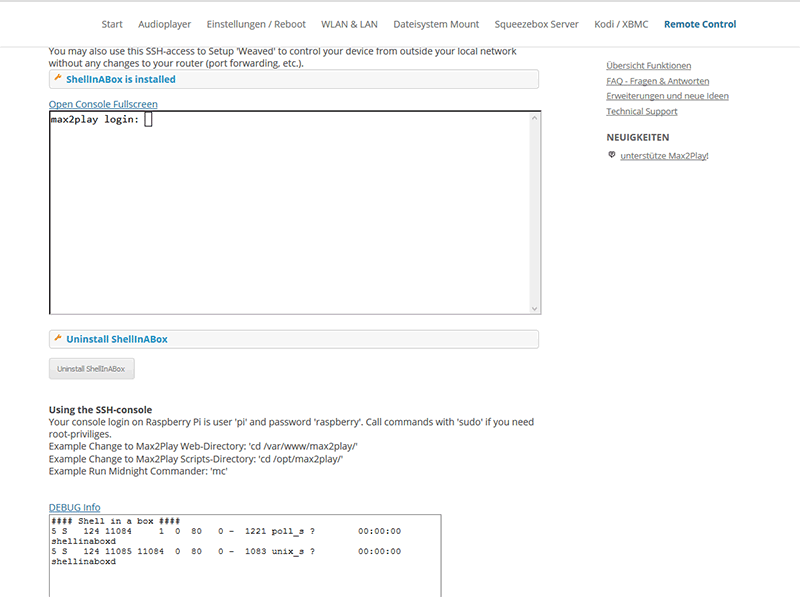
If it doesnt show any process running, please try to uninstall and reinstall ShellinaBox.
Stefan
9. August 2016 at 18:13 #22125I just finished building the CPAN resources for ARM and Perl 5.22. Michael normally doesn’t build the arm binaries as he has no Pi/Odroid.
I also adjusted the LMS-Installer Script (in BETA of Max2Play) to fetch the compiled sources from our server and put them into the right place…
If you like, you may use the installer script for Max2Play -> update to latest Beta with Web interface -> intall LMS via Web interface… no guarantee, but this should work – I will test it tomorrow with a fresh install.
-
This reply was modified 10 years, 1 month ago by
9. August 2016 at 14:27 #22099I updated the installer script for Max2Play to work with ODROID Ubuntu 16.04. There are still some other issues due to the new Ubuntu version that need to be addressed within the web interface of Max2Play, but the basic installation is working.
I will publish a Max2Play-Version for the ODROID XU4 and Ubuntu 16.04 in our Download section within the next week.
8. August 2016 at 17:28 #22085Hi Bob,
there might be some problems due to php7 and some config file changes. LMS as nightly build comes only with Perl 5.20 support for ARM, so this libraries need to be build.
I will have a look at the Max2Play installer script and see if I can fix it to work on Ubuntu 16.04 once I find the time for it.
8. August 2016 at 12:17 #22076What does the Plugin page say after you installed? Does it show „ShellInABox is installed“ and a window below saying „connection is not secure“, or does it only show the „install“ button? You may also Update Max2Play to the latest beta on the settings page and try again.
12. Juli 2016 at 14:46 #21501Good news – thanks to Marting, there is now an easy way to update the Joggler Skin with the changes from Martin. Just choose the Patch in the dropdown menu for the skins on Jivelite Page of Max2Play web interface and click install.
This is now available in the Beta of Max2Play and will be part of the official 2.34 release.
12. Juli 2016 at 10:39 #21447Thanks to OneArmedBandit this bug is solved now 🙂 I changed exactly the code you posted.
I’ll let you know when we have new plugins for testing and send you the forum links for discussions.
8. Juli 2016 at 15:24 #21341Hi Hammerhead,
well, that doesn’t sound too good… we updated the latest prebuild-sd-card-images to version 2.32. Maybe you start again with a fresh image. SD-Card expansion and wifi should work without any problems (as long as you start the expansion before the card is full). If you have a Pi 2 and not a Pi 3 with buil- in wifi, it might depend on your wifi-stick if anything is not working correct (e.g. disconnects). The kodi package is part of the image – no need to install anything.
So what are the major benefits of Max2Play: if you are only using you player for Kodi via HDMI and nothing else, you can take OpenELEC or some other distribution. If you want a flexible system with support of different players (Audioplayer, Multi-room Setup) and a lot of other things (see our features / plugins page) you won’t find a system that is this easy to configure. In other words, Kodi is just one little part of Max2Play.
5. Juli 2016 at 16:58 #21223Raymond, thanks for your investigation 🙂
When you install jivelite, it tries to keep the settings but deletes everything in the jivelite folder and this also deletes the custom skins that may have been installed before.
5. Juli 2016 at 14:42 #21209Hi Raymond,
did you choose the Digital Clock Screensaver in the Settings for the „When Off“ setting (sounds like you have set Blankscreensaver in the „When Off“ event)?
4. Juli 2016 at 15:37 #21140@OneArmedBandit:
Would you like to participate in further testing and/or Max2Play development? Your approach to solve the problem and your testing skills could help us a lot for new Addons / Features / Hardware!We are currently building a developer area for Max2Play. Main goal is to make it easier for developers to create custom Max2Play Addons and share them with the community.
All the best
Stefan4. Juli 2016 at 14:20 #21130Thanks a lot for finding that bug and your detailed report! We created a fix that is applied with any update (beta update and 2.32 update) that solves that issue.
Cheers,
Stefan4. Juli 2016 at 11:16 #21092Hi Bristow,
thanks for sharing your code! I changed it a little to keep the JogglerSkin working and added the changes to the Jivelite installer in Max2Play. If anyone is interested: update Max2Play to the latest Beta version and install Jivelite from Source (not the compiled version).
Stefan
28. Juni 2016 at 18:16 #20905Hi,
if Jivelite doesn’t show any visualisation after adding the „-v“ parameter to the startup of Squeezelite, it might be neccessary to „Reset Jivelite Settings“ on Jivelite Tab of Max2Play web interface. After this you must restart Jivelite and choose your skin (Joggler Skin for 7″ touchdisplay) and your language again. VU-Meter and Spectrum should now show up when playing music.
-
This reply was modified 9 years, 10 months ago by
-
