


The recommended image is very well suited for almost all Pi models and contains the interesting new features. Basically, you can extend each Max2Play Image with plug-ins as you like. To simplify the setup of certain applications, we offer pre-configured images for the Raspberry Pi 7″ Touch Display and for the ODROID C1/C1+/XU3/XU4. Legacy versions of Max2Play can be found in the Archive. You can install images on a SD card or eMMC module following these steps. Optionally, you can draw on pre-installed images in the Max2Play Shop. Alternative Downloadserver: Sourceforge You can reach the Max2Play web interface via the browser at Wireless setup without network cable: Hotspot SSH access Max2Play for the Raspberry Pi based on the official Raspbian Debian image. Recommended version for all Raspberry Pi models including Pi Zero (Buster): BETA version for all Raspberry Pi models including Pi Zero (Buster): for older Raspberry Pi models from Pi 1 to Pi 3 and Pi Zero (Stretch) as compatibility option: Buy pre-installed Max2Play Images on SD cards and eMMC modules The Max2Play image for the Raspberry Pi optimized for the use of the 7″ Touch Display for Raspberry Pi. The image comes with a preinstalled version of Jivelite. Buy 7″ Touch Display Bundle with HiFiBerry or IQaudIO Sound Card Max2Play for the ODROID XU series, based on the official Ubuntu 15.04 image by Hardkernel. After starting, the webinterface can be opened by pointing any webbrowser to http://max2play. Newest Image with Kodi 16. Buy pre-installed Max2Play Images on SD cards and eMMC modules Buy pre-installed Max2Play Images on SD cards and eMMC modules Max2Play for the Raspberry Pi based on the official Rasbian Debian Jessie-Image. After the start, the web interface can be reached through the browser at http://max2play/ Max2Play for the Raspberry Pi based on the official Rasbian Debian Wheezy-Image. After the start, the web interface can be reached through the browser at http://max2play/ Buy pre-installed Max2Play Images on SD cards and eMMC modules Max2Play for Raspberry PI optimized for HiFiBerry Cards with focus on easy configuration of different media players. Open the webinterface by pointing your browser to http://max2play Buy HiFiBerry Bundles with Raspberry Pi 2 und Max2Play: IQaudIO Max2Play for Raspberry PI optimized for IQaudIO Cards with focus on easy configuration of different media players. Open the webinterface by pointing your browser to http://max2play Buy IQaudIO Bundles with Raspberry Pi 2 und Max2Play: Max2Play for Raspberry PI optimized for JustBoom soundcards with focus on easy configuration of different media players and Multiroom Audio Setups. Open the webinterface by pointing your browser to http://max2play JustBoom Bundles mit Raspberry Pi 2 und Max2Play erwerben: Max2Play for Raspberry PI optimized for Allo soundcards (PianoDAC 2.1 and Kali Reclocker) with focus on easy configuration of different media players and Multiroom Audio Setups. Open the webinterface by pointing your browser to http://max2play Get JustBoom Bundles with Raspberry Pi 3 and Max2Play: The image for ODROID U2/U3/U3+: After the start, the web interface can be reached through the browser at http://max2play Buy pre-installed Max2Play Images on SD cards and eMMC modules Max2Play for the Raspberry Pi based on the official Rasbian Debian Wheezy-Image. After the start, the web interface can be reached through the browser at http://max2play Buy pre-installed Max2Play Images on SD cards and eMMC modules The Mediacenter XBMC/Kodi with PVR-Support can easily be installed / updated via Max2Play Web interface. Following links do not work with Raspberry PI! Newest Version of Kodi for ODROID U3. The PVR-Addons are also available for download. Newest Version of Kodi for ODROID XU4. PVR-Addons are also available for download. Which image to choose?
The alternative image focuses on compatibility, but contains less new features. It is well suited for older devices.
To simplify the setup of certain touchscreen applications, we also offer a preconfigured image for the Raspberry Pi 7″ Touch Display. How to install images?
Max2Play Raspberry Pi Image
http://max2play
Provided your Pi model supports WLAN,
then you can start the Pi without network cable
carry out your setup via a hotspot, e.g. using a smartphone
name: max2play password: mypasscode
user: pi password: max2play
With one click you can install the soundcards of the listed manufacturers.





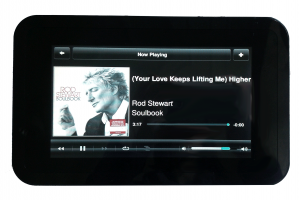
Max2Play for 7″ Touch Display (Raspberry Pi)

ODROID XU3 / XU4

ODROID C1+ (NEW)
ODROID C1 (old Version)
Archive
Max2Play Legacy versions
Max2Play Raspberry Pi Image

Max2Play HiFiBerry Image (Raspberry Pi)
HiFiBerry DAC+ Bundle
HiFiBerry AMP+ Bundle
HiFiBerry Digi+ Bundle
Max2Play IQaudIO Image (Raspberry Pi)
IQaudIO Pi-DAC+ Bundle
IQaudIO Pi-DigiAMP+ Bundle

Max2Play JustBoom Image (Raspberry Pi)
JustBoom DAC HAT Bundle
JustBoom Amt HAT Bundle

Max2Play Allo Image (Raspberry Pi)
Allo Piano 2.1 Bundle

ODROID U2/U3/U3+

Squeezeplug Image (Raspberry Pi)


Includes pre-configuration for: